> ## Documentation Index
> Fetch the complete documentation index at: https://docs.chunkr.ai/llms.txt
> Use this file to discover all available pages before exploring further.
# Extract Overview
> Transform documents into structured data with granular citations
The Extract feature transforms parsed documents into structured data based on your defined schema.
Each extracted value comes with granular citations and confidence.
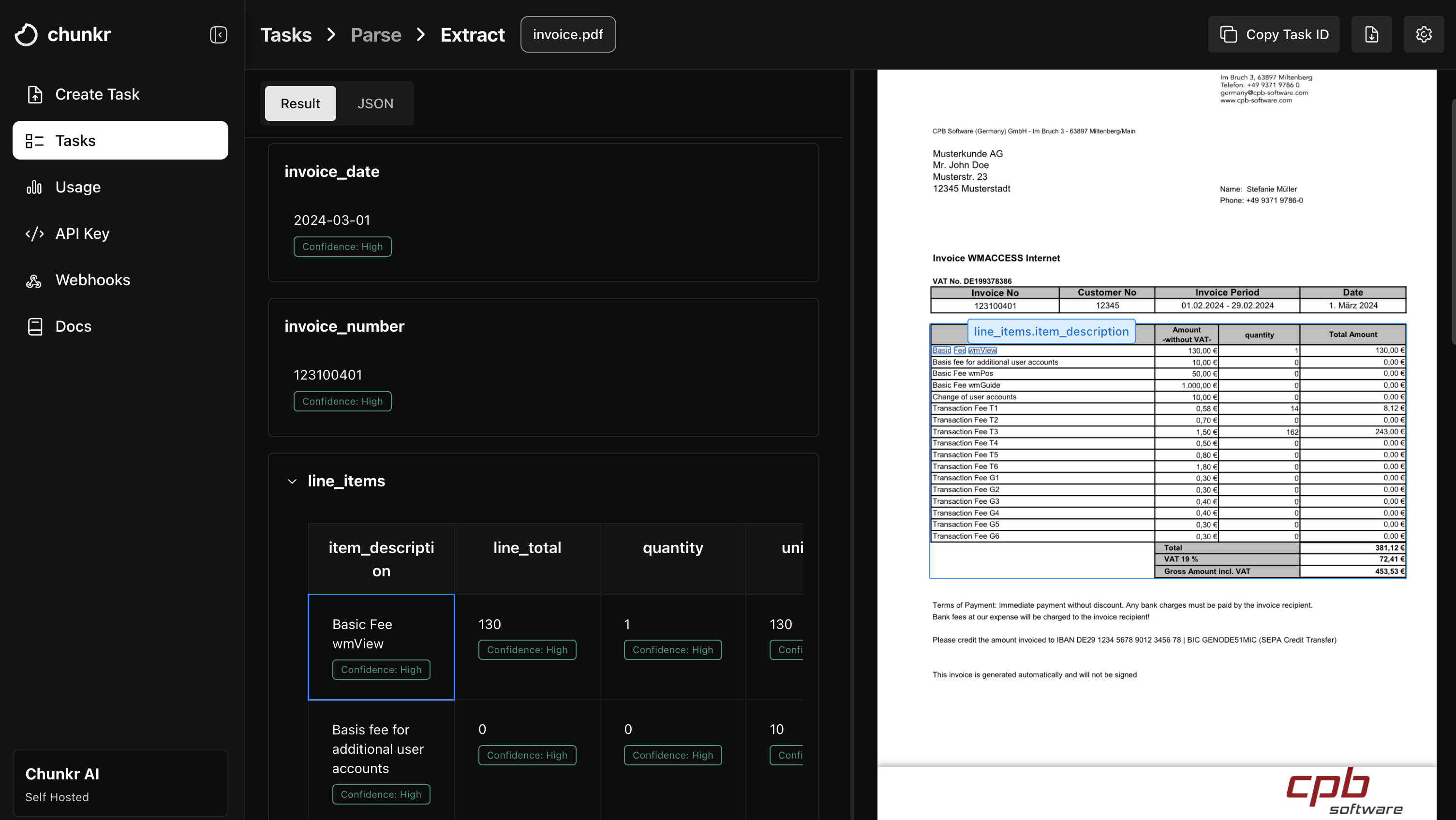 It takes parsed document output (or performs parsing automatically) and intelligently fills your custom JSON schema with precise data extraction, complete with source citations and confidence metrics for every extracted field.
## Key Features
* **Schema-driven extraction**: Define your exact data structure using JSON Schema and get perfectly formatted results.
* **Granular citations**: Every extracted value includes precise source references to the original document location.
* **Confidence scoring**: Built-in confidence metrics for each extracted field to assess reliability.
* **Flexible input options**: Works with existing parse tasks, raw documents, or remote URLs.
* **Intelligent field mapping**: Automatically identifies and maps document content to your schema fields.
***
Extract builds on top of Parse. If you provide a raw document, a parse task will be created automatically, and then the extract task will be created using the parse task ID.
See [API Reference](/api-references/tasks/create-extract-task) for more details on how to configure the parse task that will be automatically created.
## How It Works
1. **Input Processing**: Extract accepts either a raw document (URL, file upload, or base64) or a reference to an existing parse task.
2. **Schema Analysis**: Your JSON schema is analyzed to understand the target data structure and field requirements.
3. **Intelligent Extraction**: The system maps document content to your schema fields using AI.
4. **Citation & Scoring**: Each extracted value is annotated with source citations and confidence.
5. **Structured Output**: Returns your data in the exact schema format with enriched metadata.
### Make a JSON Schema
Use Pydantic or Zod to define your schema, then pass the generated JSON schema to Extract.
```python Python theme={"system"}
import os
from typing import List, Optional
from chunkr_ai import Chunkr
from pydantic import BaseModel
class Vendor(BaseModel):
vendor_name: str
vendor_id: Optional[str] = None
contact_email: Optional[str] = None
phone_number: Optional[str] = None
address: Optional[str] = None
class InvoiceLineItem(BaseModel):
item_description: str
quantity: float
unit_price: float
line_total: float
class Invoice(BaseModel):
invoice_number: str
invoice_date: str
due_date: str
vendor: Vendor
line_items: List[InvoiceLineItem]
subtotal: float
tax_amount: float
total_amount: float
payment_terms: Optional[str] = None
# Convert Pydantic model to JSON schema
schema = Invoice.model_json_schema()
client = Chunkr(api_key=os.environ["CHUNKR_API_KEY"])
url = "https://s3.us-east-1.amazonaws.com/chunkr-web/uploads/invoice.pdf"
task = client.tasks.extract.create(
file=url, schema=schema
) # Pass the schema to the extract task
```
```typescript TypeScript theme={"system"}
import Chunkr from "chunkr-ai";
import * as z from "zod";
const VendorSchema = z.object({
vendor_name: z.string(),
vendor_id: z.string().optional(),
contact_email: z.string().optional(),
phone_number: z.string().optional(),
address: z.string().optional(),
});
const InvoiceLineItemSchema = z.object({
item_description: z.string(),
quantity: z.number(),
unit_price: z.number(),
line_total: z.number(),
});
const InvoiceSchema = z.object({
invoice_number: z.string(),
invoice_date: z.string(),
due_date: z.string(),
vendor: VendorSchema,
line_items: z.array(InvoiceLineItemSchema),
subtotal: z.number(),
tax_amount: z.number(),
total_amount: z.number(),
payment_terms: z.string().optional(),
});
// Convert Zod schema to JSON schema
const schema = z.toJSONSchema(InvoiceSchema);
const client = new Chunkr({
apiKey: process.env.CHUNKR_API_KEY,
});
const url = "https://s3.us-east-1.amazonaws.com/chunkr-web/uploads/invoice.pdf";
const task = await client.tasks.extract.create({
file: url,
schema: schema,
});
```
### Input Options
* From a URL, a local upload using `client.files.create`, base64, or from an existing parse task ID.
```python Python theme={"system"}
import os
import time
from chunkr_ai import Chunkr
client = Chunkr(api_key=os.environ["CHUNKR_API_KEY"])
# From URL
task = client.tasks.extract.create(
file="https://s3.us-east-1.amazonaws.com/chunkr-web/uploads/invoice.pdf",
schema=schema,
)
# From local file (upload-first)
with open("path/to/doc.pdf", "rb") as f:
up = client.files.create(file=f)
task2 = client.tasks.extract.create(file=up.url, schema=schema)
# From base64
task3 = client.tasks.extract.create(
file="data:application/pdf;base64,...", schema=schema
)
# From an existing parse task
parse_task = client.tasks.parse.get(task_id="parse_task_id")
task4 = client.tasks.extract.create(file=parse_task.task_id, schema=schema)
```
```typescript TypeScript theme={"system"}
import Chunkr from "chunkr-ai";
import fs from "fs";
const client = new Chunkr({ apiKey: process.env.CHUNKR_API_KEY! });
// From URL
const task = await client.tasks.extract.create({
file: "https://s3.us-east-1.amazonaws.com/chunkr-web/uploads/invoice.pdf",
schema,
});
// From local file (upload-first)
const fileStream = fs.createReadStream("path/to/doc.pdf");
const up = await client.files.create({
file: fileStream,
file_metadata: JSON.stringify({ name: "doc.pdf", type: "application/pdf" }),
});
const task2 = await client.tasks.extract.create({ file: up.url, schema });
// From base64
const task3 = await client.tasks.extract.create({
file: "data:application/pdf;base64,...",
schema,
});
// From an existing parse task
const parseTask = await client.tasks.parse.get("parse_task_id");
const task4 = await client.tasks.extract.create({
file: parseTask.task_id,
schema,
});
```
When referencing an existing parse task, you cannot provide `parse_configuration` or `file_name` parameters, as these are inherited from the original parse task.
Extract supports all Parse configuration options when processing raw documents, plus extraction-specific settings:
### Extraction Configuration
* **Schema (`schema`)**: Your JSON Schema definition that describes the target data structure. Required field.
* **System Prompt (`system_prompt`)**: Customize the LLM prompt for extraction. Default: "You are an expert at structured data extraction. You will be given parsed text from a document and should convert it into the given structure."
* **Task Expiration (`expires_in`)**: Set automatic cleanup time in seconds for completed tasks.
For an overview of Parse configuration options, see [Parse Configuration](/pages/features/parse/overview#advanced-configuration).
***
## Best Practices
1. **Schema Design**: Create clear, well-structured schemas with descriptive field names to improve extraction accuracy.
2. **Type Specificity**: Use appropriate JSON Schema types (string, number, boolean, array, object) and formats (date, email, uri) for better results.
3. **Include Field Descriptions**: Use Pydantic's `Field(description="...")` or Zod's `.describe()` to provide context.
4. **Parse Task Reuse**: When extracting multiple schemas from the same document, parse once and reference the task ID for efficiency.
5. **Citation Verification**: Use the provided citations to build audit trails and allow users to verify extracted data against source documents.
It takes parsed document output (or performs parsing automatically) and intelligently fills your custom JSON schema with precise data extraction, complete with source citations and confidence metrics for every extracted field.
## Key Features
* **Schema-driven extraction**: Define your exact data structure using JSON Schema and get perfectly formatted results.
* **Granular citations**: Every extracted value includes precise source references to the original document location.
* **Confidence scoring**: Built-in confidence metrics for each extracted field to assess reliability.
* **Flexible input options**: Works with existing parse tasks, raw documents, or remote URLs.
* **Intelligent field mapping**: Automatically identifies and maps document content to your schema fields.
***
Extract builds on top of Parse. If you provide a raw document, a parse task will be created automatically, and then the extract task will be created using the parse task ID.
See [API Reference](/api-references/tasks/create-extract-task) for more details on how to configure the parse task that will be automatically created.
## How It Works
1. **Input Processing**: Extract accepts either a raw document (URL, file upload, or base64) or a reference to an existing parse task.
2. **Schema Analysis**: Your JSON schema is analyzed to understand the target data structure and field requirements.
3. **Intelligent Extraction**: The system maps document content to your schema fields using AI.
4. **Citation & Scoring**: Each extracted value is annotated with source citations and confidence.
5. **Structured Output**: Returns your data in the exact schema format with enriched metadata.
### Make a JSON Schema
Use Pydantic or Zod to define your schema, then pass the generated JSON schema to Extract.
```python Python theme={"system"}
import os
from typing import List, Optional
from chunkr_ai import Chunkr
from pydantic import BaseModel
class Vendor(BaseModel):
vendor_name: str
vendor_id: Optional[str] = None
contact_email: Optional[str] = None
phone_number: Optional[str] = None
address: Optional[str] = None
class InvoiceLineItem(BaseModel):
item_description: str
quantity: float
unit_price: float
line_total: float
class Invoice(BaseModel):
invoice_number: str
invoice_date: str
due_date: str
vendor: Vendor
line_items: List[InvoiceLineItem]
subtotal: float
tax_amount: float
total_amount: float
payment_terms: Optional[str] = None
# Convert Pydantic model to JSON schema
schema = Invoice.model_json_schema()
client = Chunkr(api_key=os.environ["CHUNKR_API_KEY"])
url = "https://s3.us-east-1.amazonaws.com/chunkr-web/uploads/invoice.pdf"
task = client.tasks.extract.create(
file=url, schema=schema
) # Pass the schema to the extract task
```
```typescript TypeScript theme={"system"}
import Chunkr from "chunkr-ai";
import * as z from "zod";
const VendorSchema = z.object({
vendor_name: z.string(),
vendor_id: z.string().optional(),
contact_email: z.string().optional(),
phone_number: z.string().optional(),
address: z.string().optional(),
});
const InvoiceLineItemSchema = z.object({
item_description: z.string(),
quantity: z.number(),
unit_price: z.number(),
line_total: z.number(),
});
const InvoiceSchema = z.object({
invoice_number: z.string(),
invoice_date: z.string(),
due_date: z.string(),
vendor: VendorSchema,
line_items: z.array(InvoiceLineItemSchema),
subtotal: z.number(),
tax_amount: z.number(),
total_amount: z.number(),
payment_terms: z.string().optional(),
});
// Convert Zod schema to JSON schema
const schema = z.toJSONSchema(InvoiceSchema);
const client = new Chunkr({
apiKey: process.env.CHUNKR_API_KEY,
});
const url = "https://s3.us-east-1.amazonaws.com/chunkr-web/uploads/invoice.pdf";
const task = await client.tasks.extract.create({
file: url,
schema: schema,
});
```
### Input Options
* From a URL, a local upload using `client.files.create`, base64, or from an existing parse task ID.
```python Python theme={"system"}
import os
import time
from chunkr_ai import Chunkr
client = Chunkr(api_key=os.environ["CHUNKR_API_KEY"])
# From URL
task = client.tasks.extract.create(
file="https://s3.us-east-1.amazonaws.com/chunkr-web/uploads/invoice.pdf",
schema=schema,
)
# From local file (upload-first)
with open("path/to/doc.pdf", "rb") as f:
up = client.files.create(file=f)
task2 = client.tasks.extract.create(file=up.url, schema=schema)
# From base64
task3 = client.tasks.extract.create(
file="data:application/pdf;base64,...", schema=schema
)
# From an existing parse task
parse_task = client.tasks.parse.get(task_id="parse_task_id")
task4 = client.tasks.extract.create(file=parse_task.task_id, schema=schema)
```
```typescript TypeScript theme={"system"}
import Chunkr from "chunkr-ai";
import fs from "fs";
const client = new Chunkr({ apiKey: process.env.CHUNKR_API_KEY! });
// From URL
const task = await client.tasks.extract.create({
file: "https://s3.us-east-1.amazonaws.com/chunkr-web/uploads/invoice.pdf",
schema,
});
// From local file (upload-first)
const fileStream = fs.createReadStream("path/to/doc.pdf");
const up = await client.files.create({
file: fileStream,
file_metadata: JSON.stringify({ name: "doc.pdf", type: "application/pdf" }),
});
const task2 = await client.tasks.extract.create({ file: up.url, schema });
// From base64
const task3 = await client.tasks.extract.create({
file: "data:application/pdf;base64,...",
schema,
});
// From an existing parse task
const parseTask = await client.tasks.parse.get("parse_task_id");
const task4 = await client.tasks.extract.create({
file: parseTask.task_id,
schema,
});
```
When referencing an existing parse task, you cannot provide `parse_configuration` or `file_name` parameters, as these are inherited from the original parse task.
Extract supports all Parse configuration options when processing raw documents, plus extraction-specific settings:
### Extraction Configuration
* **Schema (`schema`)**: Your JSON Schema definition that describes the target data structure. Required field.
* **System Prompt (`system_prompt`)**: Customize the LLM prompt for extraction. Default: "You are an expert at structured data extraction. You will be given parsed text from a document and should convert it into the given structure."
* **Task Expiration (`expires_in`)**: Set automatic cleanup time in seconds for completed tasks.
For an overview of Parse configuration options, see [Parse Configuration](/pages/features/parse/overview#advanced-configuration).
***
## Best Practices
1. **Schema Design**: Create clear, well-structured schemas with descriptive field names to improve extraction accuracy.
2. **Type Specificity**: Use appropriate JSON Schema types (string, number, boolean, array, object) and formats (date, email, uri) for better results.
3. **Include Field Descriptions**: Use Pydantic's `Field(description="...")` or Zod's `.describe()` to provide context.
4. **Parse Task Reuse**: When extracting multiple schemas from the same document, parse once and reference the task ID for efficiency.
5. **Citation Verification**: Use the provided citations to build audit trails and allow users to verify extracted data against source documents.